
What is a scroll saw and how do I operate one? A scroll saw is a power tool used for cutting intricate designs and curves in wood. Operating one involves understanding its parts, safety precautions, blade selection, cutting techniques, and basic maintenance. This guide will walk you through everything a beginner needs to know to use a scroll saw easily and safely.
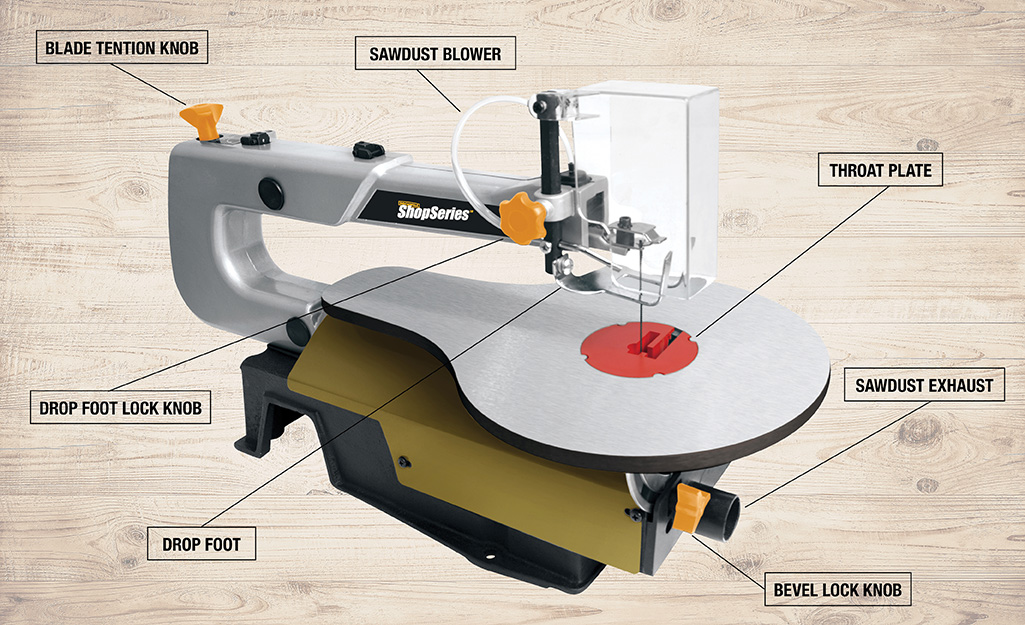
Image Source: contentgrid.homedepot-static.com
Getting Started with Your Scroll Saw
The scroll saw might look a little intimidating at first, but with a little practice and the right knowledge, you’ll be creating beautiful projects in no time. This tool is fantastic for detailed work, from delicate fretwork to intricate inlay patterns. Let’s dive into how to get the most out of your scroll saw.
Familiarizing Yourself with Scroll Saw Parts
Before you even think about turning on the power, take a few minutes to learn the different parts of your scroll saw. Knowing what each part does will help you use it correctly and safely.
- Table: This is where you rest your workpiece. It’s usually flat and has a throat plate in the center with a hole for the blade.
- Blade Clamp: These hold the scroll saw blade securely in place. They can be wingnut style or quick-release.
- Blade Guard: This is a cover that protects you from the moving blade. Always keep it in place.
- Speed Control: This adjusts how fast the blade moves up and down.
- Dust Blower/Port: A stream of air or a port for a vacuum helps keep your cutting line clear of dust.
- Arm: The upper and lower arms hold the blade and drive mechanism.
- On/Off Switch: Your tool’s power button.
Essential Scroll Saw Safety Practices
Scroll saw safety is paramount. This machine has a fast-moving blade, so following safety guidelines is not optional.
- Wear Safety Glasses: Always wear a good pair of safety glasses or a face shield. Wood chips and dust can fly.
- Keep Your Hands Away from the Blade: Maintain a safe distance from the blade at all times. Never force the wood.
- Secure Your Workpiece: Ensure your wood is flat on the table and held firmly. Don’t try to cut small scraps that are hard to hold.
- Unplug When Changing Blades: Always unplug the saw before changing the blade or making any adjustments.
- Proper Clothing: Avoid loose clothing, jewelry, or long hair that could get caught in the blade.
- Good Lighting: Make sure your workspace is well-lit so you can see your cutting line clearly.
- Dust Collection: Use a dust collection system or wear a dust mask to protect your lungs.
- Know Your Saw: Read your scroll saw’s manual thoroughly. Every saw is a little different.
Choosing the Right Scroll Saw Blade
The type of scroll saw blade types you use makes a big difference in how well and how easily you cut. Blades vary in width, tooth count, and design.
Blade Width and Tooth Count
- Width: Thicker blades are stronger and better for straighter cuts. Thinner blades are best for tight curves and intricate patterns.
- Tooth Count (TPI – Teeth Per Inch):
- Low TPI (e.g., 4-10 TPI): Coarser teeth cut faster but leave a rougher edge. Good for general cutting and thicker wood.
- Medium TPI (e.g., 10-16 TPI): A good balance for most tasks, offering a decent cut speed and a smoother finish.
- High TPI (e.g., 16-32 TPI): Finer teeth cut slower but produce a very smooth finish. Ideal for delicate work and thin materials.
Blade Types for Different Cuts
- Standard Tooth Blades: These have teeth that point straight up. They are good all-around blades.
- Reverse Tooth Blades: These blades have a tooth pointing down near the end. This helps prevent splintering on the bottom surface of the wood, giving you a cleaner cut. They are excellent for scroll saw cutting curves and detailed work.
- Skip Tooth Blades: These have gaps between the teeth. They cut faster and clear chips better, making them good for thicker woods.
- Double Tooth Blades: These have two teeth followed by a skip. They offer a good balance of speed and smoothness.
- Metal Cutting Blades: These are specifically designed for cutting thin metal and have very fine, sharp teeth.
- Plastic Cutting Blades: Similar to metal blades, these are made for cutting plastics without melting.
Table: Blade Selection Guide
| Wood Thickness | Desired Cut Finish | Recommended TPI | Blade Type Example |
|---|---|---|---|
| Up to 1/2 inch | Rough Cut | 4-8 | Standard Tooth, Skip Tooth |
| Up to 1/2 inch | Smooth Cut | 10-14 | Standard Tooth, Reverse Tooth |
| 1/2 inch to 1 inch | Rough Cut | 6-10 | Skip Tooth |
| 1/2 inch to 1 inch | Smooth Cut | 10-16 | Standard Tooth, Reverse Tooth |
| Over 1 inch | Rough Cut | 4-8 | Skip Tooth |
| Delicate Work | Very Smooth | 20-32 | Fine Tooth, Reverse Tooth |
Tip: Always test your blade on a scrap piece of wood before starting your main project to see how it cuts.
Operating Your Scroll Saw: Step-by-Step
Now that you’re familiar with the parts and safety, let’s get to the actual operation.
Setting Up Your Scroll Saw
- Placement: Put your scroll saw on a stable workbench. If it’s a benchtop model, you might want to clamp it down.
- Blade Installation:
- Ensure the saw is unplugged.
- Lift the upper arm to access the top blade clamp and lower arm for the bottom clamp.
- Insert the blade’s pin-end into the upper clamp, teeth facing down. Tighten the clamp securely.
- Insert the blade’s pinless end into the lower clamp, teeth facing down. Tighten the clamp.
- The blade should be taut, like a guitar string. Too loose, and it will wander; too tight, and it might break.
- Tension Adjustment: Most saws have a tension knob. Adjust it until the blade is tight. You can test this by gently flicking the blade – it should make a slight “ping” sound.
- Throat Plate: Make sure the correct throat plate is installed for your blade. Some saws come with different plates for various blade widths.
- Dust Collection Setup: Connect your shop vacuum or dust collection system to the port if you have one. This is crucial for clear visibility and a healthier workspace.
Adjusting Scroll Saw Speed Settings
Scroll saw speed settings are important for controlling your cut. The general rule is:
- Faster Speed: For softer woods and straight cuts.
- Slower Speed: For harder woods, intricate patterns, and delicate materials to prevent burning or blade breakage.
Most saws have a dial or lever. Start with a medium speed and adjust as needed. If you see smoke, you’re cutting too fast or using the wrong blade. If the blade feels like it’s struggling, increase the speed slightly.
Placing Your Workpiece and Making the Cut
- Positioning: Place the wood flat on the saw’s table. Align your cutting line with the blade.
- Starting the Cut: Turn on the saw. Gently guide the wood into the blade. Don’t push too hard. Let the blade do the work.
- Guiding the Wood: Use your hands to guide the workpiece smoothly through the blade. Keep your fingers a safe distance from the blade at all times.
- Cutting Curves: For scroll saw cutting curves, rotate the workpiece, not your body. Keep the wood against the fence if your saw has one, or use both hands to control the direction. Slow down as you approach tighter curves.
- Making Inside Cuts: To cut a design inside a piece of wood (like a silhouette), you’ll need to drill a small pilot hole inside the waste area of your design. Then, detach one end of your scroll saw blade, thread it through the hole, reattach the blade to both clamps, and then cut along your design. This is where reverse tooth blades are very helpful for a clean finish.
Advanced Scroll Saw Techniques
Once you’re comfortable with basic cuts, explore these scroll saw techniques for more advanced work:
- Bevel Cuts: Some scroll saws have tilting tables that allow you to make angled cuts. This is useful for creating box joints or decorative edges.
- Planing Cuts: For very thin cuts on the edge of a workpiece, you can sometimes tilt the blade slightly against the workpiece. This is an advanced technique and requires practice.
- Cutting Veneer: Use a very fine-tooth blade and a slow speed to cut wood veneer cleanly.
- Stacking Cuts: For identical shapes, you can stack several pieces of thin wood, clamp them together, and cut them all at once. Ensure they are clamped very securely.
Scroll Saw Projects for Beginners
Starting with simple scroll saw projects will build your confidence and skills. Here are some ideas:
- Simple Puzzles: Cut out basic shapes like animals or letters from plywood.
- Coasters: Create decorative coasters with simple patterns or monograms.
- Ornaments: Cut out festive designs for holidays.
- Wooden Animals: Start with simpler silhouettes and progress to more detailed ones.
- Name Plates: Cut out names with decorative fonts.
- Small Boxes: Practice making straight and curved cuts to assemble simple boxes.
When selecting scroll saw projects, look for patterns that match your current skill level and the types of blades you have.
Scroll Saw Maintenance and Troubleshooting
Proper scroll saw maintenance will keep your tool running smoothly and safely.
Keeping Your Scroll Saw in Top Shape
- Cleaning: After each use, clean the table, blade clamps, and any dust ports. A brush and compressed air work well.
- Blade Changes: Change blades when they become dull or broken. Dull blades cut poorly and can cause burning.
- Lubrication: Check your manual for any lubrication points. Some saws may require occasional oiling of moving parts.
- Dust Collection System: Keep your vacuum or dust collector clean and the filters clear. A clogged system won’t remove dust effectively, impacting your visibility and the health of your lungs. Good scroll saw dust collection is a must-have.
Common Scroll Saw Troubleshooting
Here are some common issues you might encounter and how to address them:
| Problem | Possible Cause | Solution |
|---|---|---|
| Blade breaks frequently | Blade tension too high; Using wrong blade type; Pushing wood too fast; Blade is dull. | Reduce blade tension; Use a thicker or stronger blade; Let the blade do the cutting; Change to a new blade. |
| Blade wanders | Blade tension too low; Blade is dull; Using a blade too thin for the cut; Sawing too fast. | Increase blade tension; Change to a new, sharper blade; Use a thicker blade for straighter cuts; Slow down your feed rate. |
| Burning wood | Blade is dull; Saw speed too slow; Pushing wood too fast; Using the wrong blade. | Change to a sharp blade; Increase saw speed (for appropriate wood type); Slow down and let the blade cut; Use a finer tooth blade. |
| Rough cuts | Dull blade; Using a blade with too few teeth (low TPI); Pushing wood too fast. | Change to a sharp blade; Use a blade with higher TPI; Slow down your feed rate. |
| Blade chatters or vibrates | Blade tension too loose; Blade is not seated properly; Arm tension is off. | Increase blade tension; Ensure the blade is correctly seated in the clamps; Check your saw’s manual for arm tension adjustments. |
| Dust obscuring cut line | Inadequate dust collection; Blade guard not positioned correctly. | Improve dust collection setup; Ensure the dust blower is active and air flow is directed to the blade; Adjust blade guard for better dust removal. |
When troubleshooting, always start with the simplest solutions first. Often, a fresh, sharp blade and correct blade tension can solve many problems.
Optimizing Your Workspace for Scroll Saw Use
A well-organized and equipped workspace makes scroll saw work more enjoyable and productive.
Improving Visibility with Scroll Saw Dust Collection
As mentioned, good scroll saw dust collection is vital. A clean cutting line means you can see exactly where you’re cutting, leading to more accurate results. Consider these options:
- Shop Vacuum: A powerful shop vacuum connected to the saw’s dust port is very effective.
- Dust Blower: Many saws have a small blower that directs air to the blade. Ensure it’s working and positioned correctly.
- Combination: Using both a vacuum and a blower provides the best visibility.
Lighting and Ergonomics
- Task Lighting: A good adjustable task lamp can focus light directly on your cutting area.
- Ergonomic Setup: Position your saw so you can work comfortably without straining. The table height should be at a comfortable level for you.
Frequently Asked Questions (FAQ)
Q1: Can I cut metal or plastic with a standard scroll saw blade?
A1: No, you should not. Standard blades are designed for wood. For metal and plastic, you need specialized blades that are thinner and have finer teeth. Always check the specifications for your saw and the blades you are using.
Q2: How often should I change my scroll saw blade?
A2: This depends on how much you use the saw and the type of wood you’re cutting. A good rule of thumb is to change it when you notice cutting becoming more difficult, the finish is rougher than usual, or the blade feels dull to the touch. For frequent users, changing blades every few hours of cutting is common.
Q3: What is the easiest way to make a perfect circle with a scroll saw?
A3: While freehand cutting is possible with practice, using a circle cutting jig is the easiest way to cut perfect circles. These jigs attach to your saw’s table and have an adjustable arm that guides the workpiece around the blade in a perfect circular path.
Q4: Can I use my scroll saw for general lumber cutting?
A4: Scroll saws are designed for intricate and detailed cuts, not for rough lumber cutting. For ripping boards to width or crosscutting long pieces of lumber, you would use a table saw or a miter saw. Using a scroll saw for these tasks will likely result in broken blades and poor quality cuts.
Q5: What is the difference between pin-end and pinless scroll saw blades?
A5: Pin-end blades have small pins at each end that fit into specific slots in the blade clamps. Pinless blades are smooth at the ends and are held in place by the clamping mechanism of the saw. Most modern scroll saws are designed to accept both types, but it’s always good to check your saw’s manual.
By following these guidelines, prioritizing scroll saw safety, selecting the right scroll saw blade types, mastering scroll saw techniques, and performing regular scroll saw maintenance, you’ll be well on your way to enjoying this versatile tool for all your scroll saw projects. Happy cutting!